
PlayPlay allows you to generate an image in just a few seconds from a simple text prompt, thanks to Artificial Intelligence (AI).
Here’s how, from your project:
-
Click on the Generate AI Image button.
-
Enter your prompt, describing it as clearly and precisely as possible to get the best results. Then, choose the desired format (square, vertical, or horizontal) and click Generate.
Note: Content that is violent, illegal, harmful, or harassing cannot be generated. For ethical reasons, the AI also cannot create visuals of well-known individuals or branded products/logos. Please refer to Google’s use policy for the full list of prohibited use cases.
-
Once the images are generated, select the ones you prefer and click Import Image. Use the Other versions option to explore new variations, or Back to adjust or rewrite your prompt.
-
The image will then be available in your project library: you can add it to the screen of your choice, rename it, download it, or delete it if needed.
-
You can generate a wide variety of image styles from your text prompt:
|
Photorealistic photography |
Illustrations and artwork |
Shapes and materials |
Historical art references |
Graphic design elements |
|
Close-ups, wide-angle shots, black & white, Polaroid, HDR, bokeh, studio photography, etc. |
Pencil sketches, charcoal, pastel, paintings, digital renders, art deco, pop art, renaissance, impressionism, etc. |
Objects “made of” wood, metal, paper, cheese, neon tubes shaped like animals, origami, etc. |
Renaissance, impressionism, pop art, and other iconic movements. |
Flyers, layouts, etc. |
-
It is not possible to upload and edit your own image with this feature: you can only describe the visual you want in text.
-
Transparent PNG images cannot be generated. However, you can use the Remove background feature to achieve this result.
-
A good prompt is descriptive, clear, and makes use of relevant keywords and modifiers. Start by thinking about the subject, the context, and the style:
Image text: A sketch (style) of a modern apartment (subject) surrounded by skyscrapers (context and background).
- Subject: The first element to consider is the subject: the object, person, animal, or landscape you want to generate.
- Context and background: The background or setting in which the subject appears is just as important. Try different options, such as a studio with a white background, outdoors, or indoors.
- Style : Finally, add the desired style. Styles can be general (painting, photography, sketch) or very specific (pastel, charcoal, isometric 3D). You can also combine multiple styles.
|
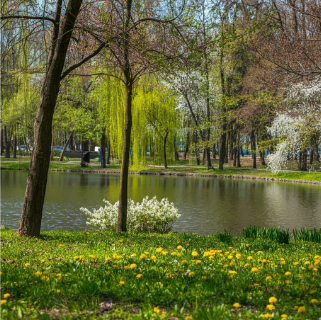
Prompt: A park in spring next to a lake. |
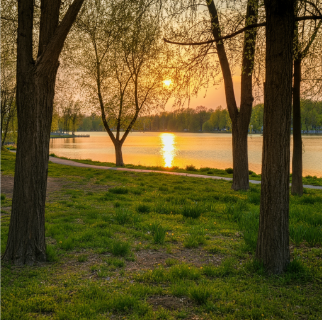
Prompt: A park in spring by a lake, the sun setting over the water, golden hour. |
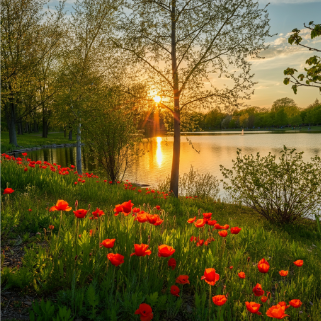
Prompt: A park in spring by a lake, the sun setting over the water, golden hour, with red wildflowers. |
💡 Want to take it a step further? Click here for more tips.